
Grainy Gradients: Why Noise Makes Gradients Look Better
 Ugo L.
A grainy gradient is a color gradient with fine noise layered into it, so the blend feels textured like film or print instead of clinically smooth. Designers reach for grain for two reasons: it hides the color banding that ruins smooth gradients on most screens, and it makes flat digital color feel physical. Here is how grain actually works, and the fastest ways to get it.
This is one, live (the texture in the blend is the grain):
Why gradients band, and why noise fixes it
A gradient that travels a long distance through similar colors has a math problem: screens display 256 levels per channel, so a soft blend often has fewer distinct color levels available than pixels to cross. Levels have to repeat, and the result is banding: visible stripes where one level steps to the next.
Noise is the classic fix, and it predates the web. Print and film solved the same problem with dithering: scatter the transition randomly instead of stepping it cleanly, and the eye reads a smooth blend. A grainy gradient is dithering promoted from a fix to an aesthetic.
The second reason is taste. Perfectly clean gradients read as corporate and synthetic. Grain adds the imperfection your eye associates with analog media, which is why grainy gradients took over album covers, editorial sites, and app onboarding screens.
The two kinds of grain
Most tools treat grain as one dial. In practice there are two different effects, and the distinction is worth knowing:
- Edge grain lives in the transitions. The noise concentrates where one color hands off to the next, roughening the boundary itself. This is the strongest anti-banding weapon and gives the blend a torn-paper, risograph character.
- Film grain is a uniform layer over everything, like scanning the whole image from film. It textures flat areas too, not just transitions, and sets the overall analog mood.
They compose: a touch of edge grain to break the blend plus a low film layer over the top is the recipe behind most of the grainy gradients you see in the wild. In the InstantGradient editor these are literally the two sliders in the Grain section, Edge and Film, both 0 to 100%.
Here is the same palette rendered three ways by the same shader:
 Edge 0%, Film 0%. Clinically smooth, and the color hand-offs form hard ridges.
 Edge 30% (the editor default), Film 0%. The noise lives only in the transitions and dissolves the ridge.
 Edge 60%, Film 35%. Film grain textures the flat areas too; the full analog look.
The fast way: generate it
- Open the gradient generator and press the spacebar until a palette clicks. The default Paper Shader style has grain built in.
- In the Grain section, raise Edge to roughen the color transitions, and add Film for the overlay. Subtlety wins: most good grainy gradients sit well under 50% on both.
- Export. Grain survives export crisply because the shader renders at the target size: 1x PNG free, or 2x up to 4K, WebP, and MP4 video with a pass. An animated export keeps the grain alive, which no static technique can do.
The hand-rolled way: CSS and SVG
There is no grain property in CSS, so the standard technique layers an SVG noise filter over a normal gradient:
.grainy {
  position: relative;
  isolation: isolate; /* keeps the blend inside this element */
  background: linear-gradient(120deg, #f4d7fb, #efae8f);
}
.grainy::after {
  content: "";
  position: absolute;
  inset: 0;
  /* an inline SVG using feTurbulence as a repeating noise tile */
  background-image: url("data:image/svg+xml,%3Csvg xmlns='http://www.w3.org/2000/svg' width='160' height='160'%3E%3Cfilter id='n'%3E%3CfeTurbulence type='fractalNoise' baseFrequency='0.8' numOctaves='2' stitchTiles='stitch'/%3E%3C/filter%3E%3Crect width='100%25' height='100%25' filter='url(%23n)' opacity='0.35'/%3E%3C/svg%3E");
  mix-blend-mode: overlay;
  pointer-events: none;
}
feTurbulence generates fractal noise, the overlay blend melts it into the gradient, and the opacity sets the grain strength. It works everywhere and costs no JavaScript. Its limits: the noise is uniform (film grain only, no edge grain), it is static, and the underlying CSS gradient still bands on long soft blends, which the noise can only partly mask.
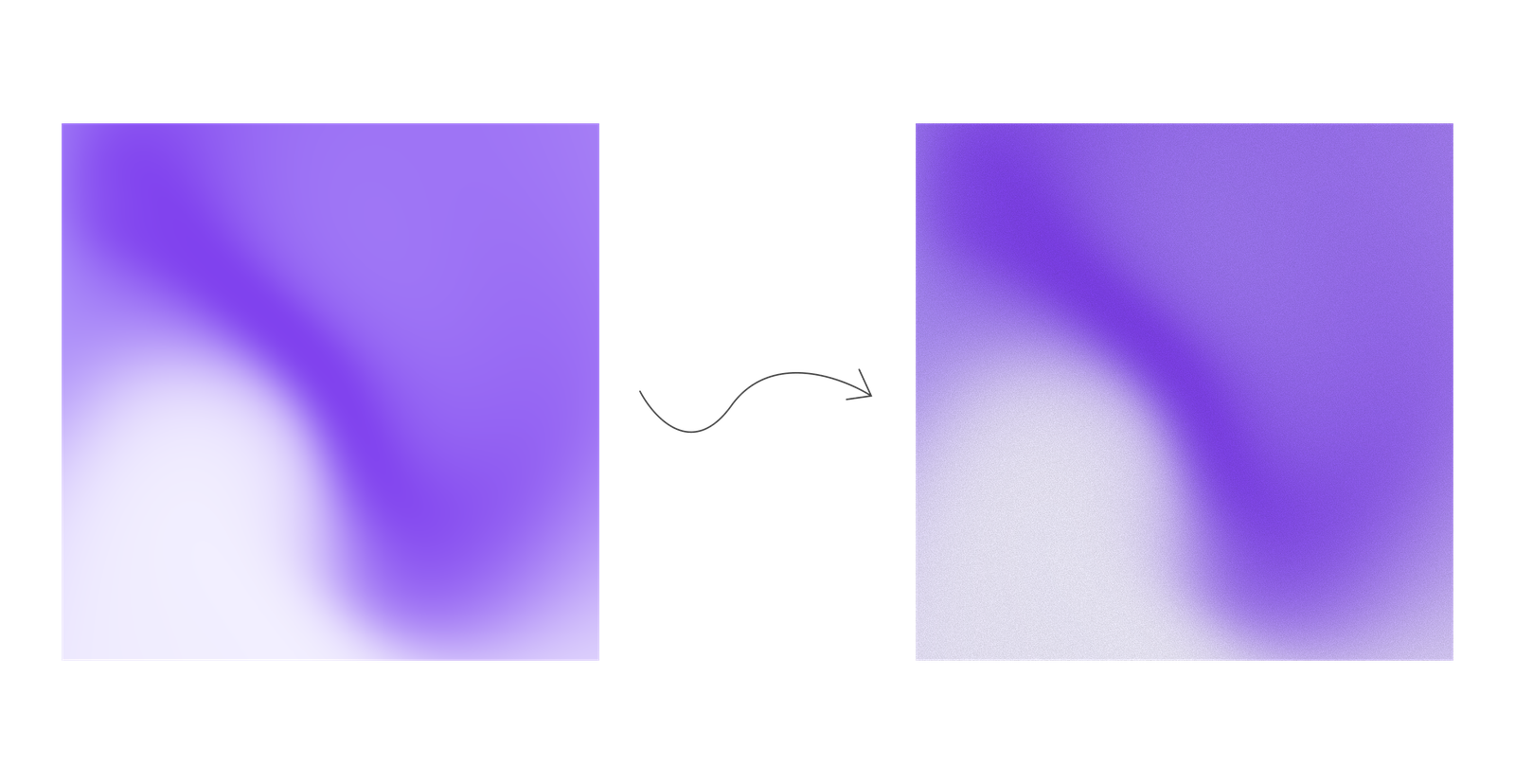
The same gradient clean, then with an feTurbulence noise overlay like the snippet above.
For hero-sized backgrounds, the more reliable pattern is exporting a grainy gradient as an image and serving it like any other asset, which is exactly what the generator's 4K export is for. More on that pattern in gradient backgrounds for websites.
Getting grain right
- Less than you think. Grain should be felt at arm's length and seen up close. If it is the first thing you notice, halve it.
- Grain loves mid-tones. Noise disappears in pure white and crushes in pure black. Palettes with soft mid-range colors show grain best; monochromatic ramps are a reliable base.
- Check compression. Heavy JPEG or WebP compression smears fine grain into mush. Export PNG for crisp grain, or raise quality settings for WebP.
- Motion changes everything. Animated grain reads as film; static grain reads as paper. Decide which mood you want before exporting an MP4 versus a PNG.
FAQ
How do you make a grainy gradient? The fastest way is a generator with grain controls, like InstantGradient: press the spacebar for a palette, raise the Edge slider to roughen the color transitions, add a little Film grain on top, and export as a 4K image or MP4 video. By hand, layer an SVG feTurbulence noise tile over a gradient in CSS, or add a noise layer set to overlay in Photoshop or After Effects.
What is a grainy gradient? A color gradient with fine noise layered into the blend, giving it a film-like or print-like texture. The noise also masks the color banding that smooth digital gradients often show on screens.
How do I fix banding in a gradient? Add noise. Banding happens because a soft blend has fewer distinct color levels than pixels to cross; scattering the transition with grain (dithering) makes it read as smooth. Edge-concentrated grain fixes it most effectively.
Can I make a grainy gradient in pure CSS? Not with CSS alone, but a standard workaround layers an SVG feTurbulence noise tile over a CSS gradient with mix-blend-mode overlay. For strong edge grain or animation, a WebGL tool like InstantGradient is needed.
What is the difference between noise and grain? In practice they name the same ingredient: random per-pixel variation. "Noise" usually refers to the generated signal (like feTurbulence), "grain" to the visual effect it produces on the image.
Keep reading
Your next gradient is one spacebar away
Free, no account needed. Just open and start creating.
Start creating