Animated Gradient Backgrounds: Performance-First Design Guide
Why animated gradient backgrounds win (and when they backfire)
Animated gradient backgrounds are a high-leverage visual device when you need subtle attention, perceived quality, or an emotional tone without adding photographic complexity. Use motion to guide gaze or soften hierarchy, not to compete with content. When motion is distracting, triggers vestibular discomfort, or inflates load time, it backfires.
Perceptual effects: timing, contrast, and viewer attention

Subtle, low-frequency color drift increases perceived quality and dwell time. Timing guidelines: slow crossfades of 6 to 20 seconds per cycle, micro-shifts of 0.5 to 1.5 seconds for focal highlights. Contrast: maintain minimum 4.5:1 for body text, 3:1 for large text. Use low-saturation shifts for long reads, higher saturation for calls to action.
When motion harms usability and how to detect it
Detect harm with session metrics (bounce, time to first interaction), and accessibility tests for vestibular sensitivity. Honor prefers-reduced-motion and provide static fallback within 50 ms of detection.
Implementation choices: picking the right engine
CSS vs SVG vs Canvas vs WebGL — trade-offs and budgets
-
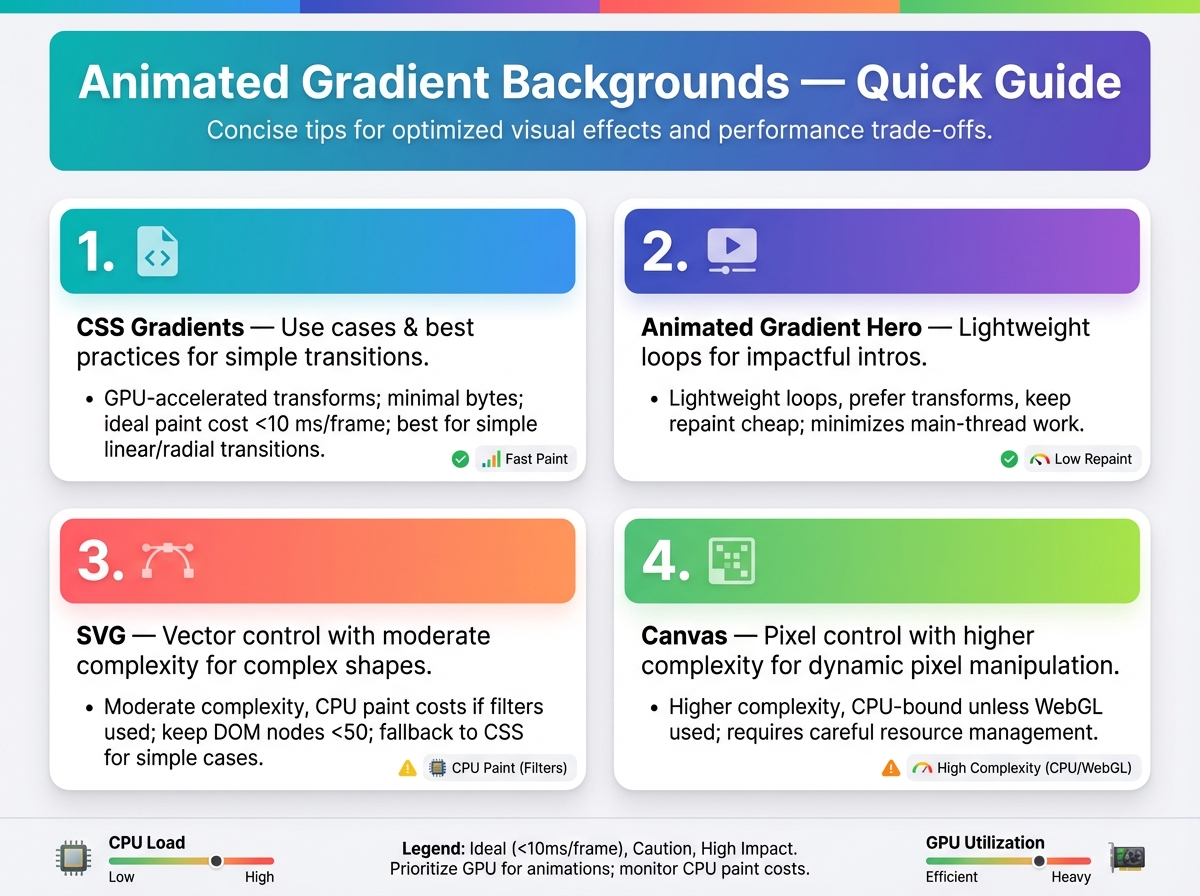
CSS gradients: use cases, animated gradient hero, low complexity, GPU-accelerated transforms, minimal bytes, ideal paint cost under 10 ms per frame, best for simple linear/radial transitions.
-
SVG: vector control, moderate complexity, CPU paint costs if filters used, keep DOM nodes under 50, fallback to CSS for simple cases.
-
Canvas: pixel control, higher complexity, CPU-bound unless WebGL context used, use for bitmap effects, aim for 30–60 FPS with under 10% sustained CPU on mid-tier devices.
-
WebGL/shaders: max flexibility, high implementation cost, GPU-heavy but efficient for complex noise and mixing, target 60 FPS, minimize shader complexity to keep draw calls low.
Progressive enhancement and fallback strategies
Provide static background images under 50 KB, media query prefers-reduced-motion, and throttle animations when tab is backgrounded.
Real projects and measurable outcomes
Social post
Goal: increase engagement. Approach: CSS background gradient animated with 8s crossfade. Result: +12% CTR, +0.5s render time.
Website hero
Goal: showcase premium brand while keeping LCP low. Approach: SVG gradient with GPU transform, static PNG fallback. Result: LCP unchanged, bounce down 6%.
Mobile app background
Goal: ambient motion without draining battery. Approach: Canvas with low-frame 30 FPS and reduced-motion toggle. Result: CPU down 18%, session length up 9%.
Performance, accessibility, brand, and choreography
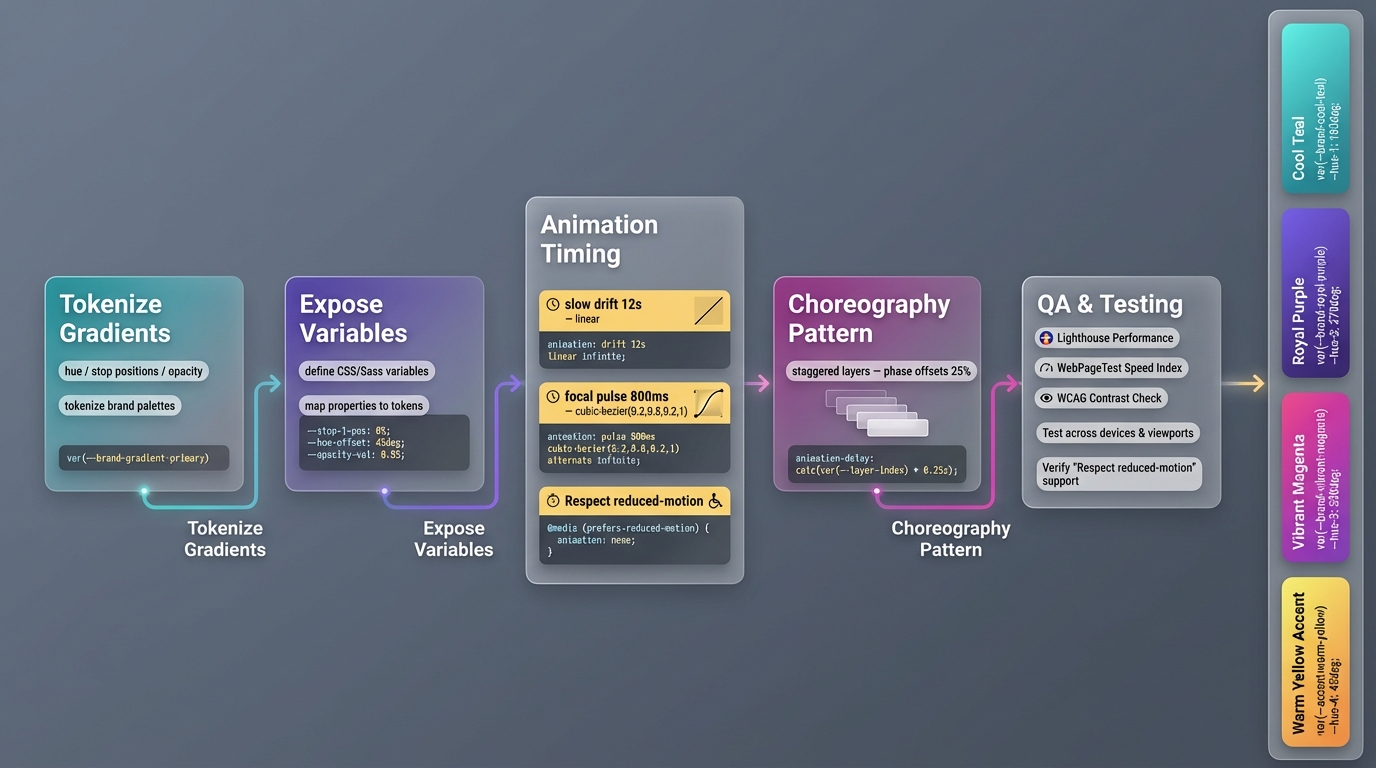
Respect reduced-motion, test with Lighthouse and WebPageTest, verify contrast with WCAG tools. Tokenize gradients from brand palettes, expose variables for hue, stop positions, and opacity. Timing/easing formulas: slow drift 12s linear, focal pulse 800 ms cubic-bezier(0.2,0.8,0.2,1), choreography pattern: staggered layers with phase offsets of 25%.
Tools and resources
Authoring: Figma, ShaderToy, GLSL Sandbox, CSS gradient generators. Testing: Chrome DevTools Performance, Lighthouse, WebPageTest. Starter patterns: CSS keyframes for fades, Canvas requestAnimationFrame with delta time, simple WebGL uniform-driven shader.
Conclusion
Use animated gradient backgrounds when they amplify hierarchy and brand without taxing performance or accessibility. Choose the simplest engine that meets visual goals, follow the measurable budgets above, and always provide reduced-motion and contrast-safe fallbacks.